E-Apostille UK: how to get one fast and get it right
By Jeremy Arhab, Founder · Published 24 August 2026 · Updated 24 August 2026
Learn how to quickly obtain your UK e-Apostille online in just days, saving time compared to the standard process. Get started now!

Yes, the UK issues e-Apostilles for eligible documents. If your document is electronically signed by a commissioned notary or solicitor, you can apply online and typically receive the e-Apostille within 1 to 2 working days once it's verified.
That speed is the whole point of the digital route. Compare it with the standard paper apostille, which can take up to 25 working days, and the case for going digital becomes obvious for anyone working to a deadline.
Here's what to do right now:
- Check the recipient will accept a PDF apostille. Not every foreign authority does yet, so confirm before you start.
- Get your document electronically signed by a commissioned notary or solicitor using an advanced or qualified electronic signature.
- Apply online and pay the fee, then download your e-Apostille as soon as it's issued.
Quick facts: the official e-Apostille fee is £35 per document, against £45 for the standard paper-based service, and processing typically takes up to 2 working days once your document is verified.
Key Takeaways
An e-Apostille costs £35 and typically clears in 1 to 2 working days, against £45 and up to 25 working days for the paper route, but only works if the underlying electronic signature meets the required standard.
| Point | Details |
|---|---|
| Check eligibility first | GRO, ACRO, and DBS certificates cannot be e-Apostilled and must go through the paper process. |
| Confirm recipient acceptance | Some foreign authorities still require a physical stamped apostille, so ask before applying. |
| Budget accurately | e-Apostille costs £35 against £45 for paper, with courier and certifier fees added separately. |
| Download and secure the file promptly | Printing a PDF does not create a valid paper apostille; keep the digital file safe instead. |
| Get the signature right first | My Notary provides notarised electronic signatures via video call to prevent rejected applications. |
Table of Contents
- What is an e-apostille UK applicants need to know about?
- Which documents qualify for an electronic apostille?
- How do I get an e-apostille in the UK step by step?
- What does an e-apostille cost compared with a paper apostille?
- How do I verify and store an e-apostille once it's issued?
- When should you choose a paper apostille instead?
- What should you check before you submit an e-apostille application?
- How does My Notary support the e-apostille process?
- What Jérémy makes of the e-apostille rollout so far
- Get your document e-apostille-ready with My Notary
- Sources
- FAQ
What is an e-apostille UK applicants need to know about?
An e-Apostille is a digitally signed PDF that bundles two things into one file: the apostille certificate itself and the underlying document it legalises. There's no separate stamp glued to a paper certificate, no wet-ink signature, no physical page to lose in the post. The whole package exists as a single, verifiable electronic file.
Verification works differently, too. Anyone receiving the document can check its authenticity through the UK's online portal by entering the apostille reference number and issue date, rather than relying on a physical seal or watermark. That's a meaningful shift from the paper process, where checking authenticity usually means contacting the issuing office directly or trusting the physical security features.
The advantages are practical rather than theoretical:
- Speed. Most e-Apostilles clear in 1 to 2 working days once verified, against weeks for paper.
- No courier risk. Nothing gets lost in transit because nothing physically travels until you choose to send it.
- Instant sharing. You can email the PDF to a foreign registry, employer, or university the moment it lands in your inbox.
The one real limitation is acceptance. Some receiving authorities abroad still expect a physical, stamped document, particularly older institutions or countries still updating their own verification systems. This is worth checking before you assume every country will take an electronic apostille the same way. If the recipient insists on paper, the digital format won't help you, however fast it is.
Which documents qualify for an electronic apostille?
Most commercially and personally significant documents are eligible: powers of attorney, company documents, educational certificates, and any paperwork that a solicitor or notary can certify and electronically sign. If a document can carry an advanced or qualified electronic signature, it's generally a candidate for the digital route.
Several categories, however, are excluded from e-Apostille and must still go through the paper process. These typically include:
- General Register Office (GRO) certificates — birth, death, and marriage certificates.
- ACRO police certificates.
- DBS certificates and similar criminal record checks.
These exclusions exist because the issuing bodies for these specific document types haven't yet built electronic signature capability into their certification process. It isn't a quirk of the apostille system itself, it's a gap in how those particular offices issue documents.
There's a further wrinkle worth flagging: some academic institutions and corporate issuers won't add an electronic signature themselves at all. In those cases, a solicitor or notary needs to step in and add the required digital signature to create an e-Apostille-ready PDF, according to practitioner guidance from Hague Apostille. If you're dealing with a birth certificate or similarly restricted document, assume paper unless told otherwise.
Pro Tip: Before you do anything else, email the receiving organisation and ask directly whether they accept an e-Apostille PDF. A five-minute email can save you a week of rework if they insist on paper.

How do I get an e-apostille in the UK step by step?
Getting this right the first time matters more than doing it quickly, because a rejected e-Apostille costs you both the fee and the processing window. Here's the sequence that avoids the most common failure points.
- Confirm eligibility and recipient requirements first. Check your document type against the ineligible list (GRO, ACRO, DBS certificates) and ask the receiving body whether they'll accept a digital apostille at all.
- Prepare a clean, final PDF of your document. No handwritten annotations, no scanned pages at an angle, no missing pages. The certifier works from exactly what you give them.
- Get the document electronically signed. A commissioned notary or solicitor applies an advanced or qualified electronic signature, the same standard the UK Legalisation Office introduced when it rolled out electronic legalisation. Not every signature format works, so this step has to come from someone equipped to issue the correct type. You can find a commissioned notary through the Faculty Office directory if you don't already have one, or use an online notarisation service that handles this remotely.
- Submit the signed PDF through the official online application and pay the fee. GOV.UK's system checks the document, and verified submissions usually clear within 1 to 2 working days.
- Download and save the e-Apostille as soon as you're notified. You'll typically be emailed when it's ready, and you can download it more than once, but don't leave it sitting unclaimed.
Miss step 3 and everything else falls apart. An ordinary electronic signature, the kind you'd use to sign off an invoice, won't meet the standard required for legalisation, and the application will bounce back.
For documents like a power of attorney, the sequence is identical, but getting the electronic signature right on the first attempt matters even more given how often these documents sit on tight deadlines for property or banking transactions abroad.
What does an e-apostille cost compared with a paper apostille?
The official GOV.UK fee for an e-Apostille is £35 per document, against £45 for the standard paper-based service. That £10 difference is only part of the story. The real saving is time, not money.
- e-Apostille processing: typically up to 2 working days once your document is verified.
- Standard paper apostille: up to 25 working days.
- Expedited paper options: next-day services are available for registered businesses, at an additional cost.
Beyond the official fee, budget for the parts GOV.UK doesn't charge for directly. Paper applications need secure courier delivery both ways, which adds real cost when you're posting original documents internationally. Electronic applications need a notary or solicitor to apply the correct electronic signature before submission, and that certification carries its own fee. If you use a third-party service to manage the whole process, factor in their charge as well.
Weighed against a 23-working-day time saving, the e-Apostille route usually wins on total cost once you include the courier fees and the value of not waiting three and a half weeks for a document you need this month.
How do I verify and store an e-apostille once it's issued?
Anyone who receives your e-Apostille, whether that's a foreign registry, university, or employer, can verify it directly through the government's online portal by entering the apostille reference number and the issue date. No login is needed on their end, and no separate certificate has to be requested. That's a genuine improvement over paper, where verification often means a phone call or a written request to the issuing office.
On your end, treat the download stage as time-sensitive. You'll usually be emailed when your document is ready, and while you can download the file more than once, don't leave it sitting unclaimed for weeks. Save it somewhere secure the moment it arrives.
- Download it immediately and store it in a password-protected folder or secure cloud storage, not just an email inbox.
- Keep a backup copy separate from the original download link, in case access expires.
- Share it as a PDF attachment or through a secure portal, never as a screenshot or a printed-then-rescanned version.
Here's a detail people miss: printing an e-Apostille does not turn it into a valid paper apostille. The physical printout has no independent legal standing of its own; it's the digital file, verifiable through the reference number, that carries the legalisation. If a recipient insists on a physical stamped document, a printed PDF won't satisfy that requirement, no matter how official it looks on the page.
Pro Tip: Rename the downloaded file with the document type and issue date the moment you save it. When you're juggling several legalised documents for an overseas transaction, a generic filename like "download.pdf" is how the wrong version ends up attached to an email.
When should you choose a paper apostille instead?
Two situations override the speed advantage of going digital: the recipient explicitly asks for paper, or your document sits in one of the ineligible categories, such as GRO birth and marriage certificates, ACRO police certificates, or DBS checks.
If you're not sure which camp you're in, the safer default depends on your timeline. With time to spare, paper remains the safer default because it's accepted virtually everywhere without question. Under real time pressure, confirm with the receiving body directly rather than guessing, because a rejected e-Apostille costs you the processing window you were trying to save.
Paper logistics look different from the digital route in a few practical ways:
- Original documents travel by post or courier, both to the legalisation office and on to the recipient, which adds cost and transit risk.
- Turnaround stretches to 25 working days under the standard service, with faster options available to registered businesses at extra cost.
- There's no reference-number verification. Recipients rely on the physical certificate itself, so damage or loss is a genuine problem in a way it simply isn't with a re-downloadable PDF.
What should you check before you submit an e-apostille application?
Most rejected applications trace back to two or three avoidable mistakes, so run through this before you submit anything.
- Is the PDF clean and final? No handwritten notes, no crooked scans, no pages missing.
- Is the electronic signature the right type? It needs to be an advanced or qualified electronic signature applied by a commissioned notary or solicitor, not a basic digital signoff.
- Has the issuing body confirmed it can add a signature electronically? Some academic and corporate issuers won't, which means a notary needs to add the signature separately.
- Do names and dates match exactly across the document, the signature block, and any supporting paperwork?
- Does the certifier's information match what the receiving authority expects to see?
If a digital signature gets rejected during submission, the usual cause is a signature format that doesn't meet the advanced or qualified standard the legalisation system checks for. Go back to whoever certified the document and confirm they used the correct signature type before resubmitting, rather than repeating the same submission and hoping it clears the second time.
Pro Tip: If an issuing body tells you they can't add an electronic signature, don't treat that as a dead end. A commissioned notary or solicitor can typically add the required signature on top of the original document, which is often faster than switching to the full paper route.
When self-troubleshooting doesn't resolve it, an authorised service that handles electronic signatures daily will usually spot the problem faster than a first-time applicant working it out alone.
How does My Notary support the e-apostille process?
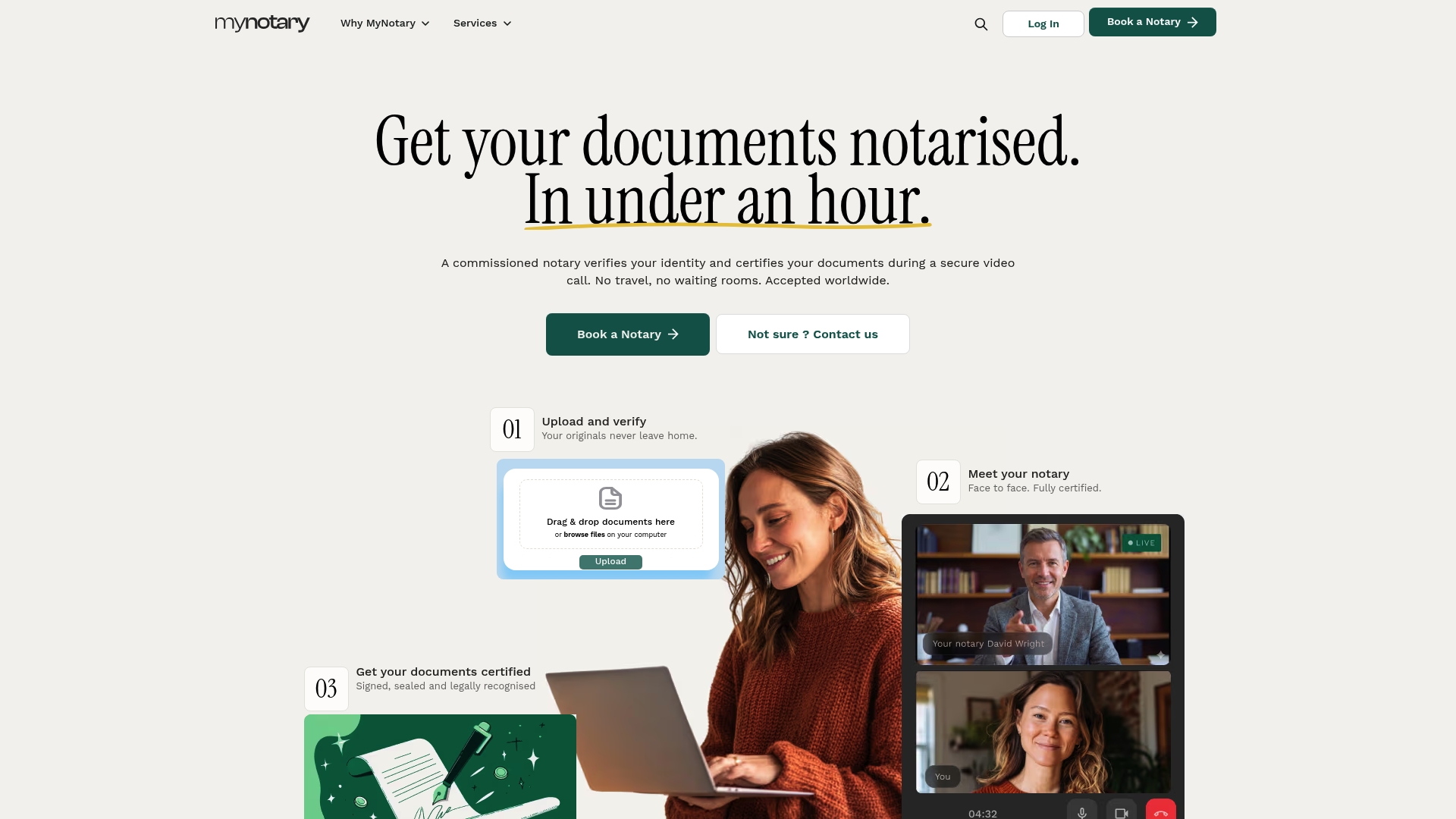
Getting the electronic signature right is the single step where most e-Apostille applications go wrong, and it's also the step My Notary is built to handle. The platform runs document certification over secure video call, verifying your identity with biometric checks before applying an electronically signed PDF that meets the standard the legalisation system expects.
That matters because a document signed the wrong way doesn't fail gracefully. It gets rejected, and you lose both the fee and several days waiting for the resubmission to clear.
- Video-call certification removes the need to visit anyone in person.
- Biometric identity verification confirms who signed before the document ever reaches the legalisation stage.
- Electronic signatures recognised in over 180 countries reduce the risk of a foreign recipient rejecting the format.
- Templates and document upload tools help you prepare a clean PDF from the outset, avoiding the scan-quality issues that cause delays.
Jérémy, who writes on document legalisation for My Notary, puts it plainly:
With an average turnaround of around one hour for notarised documents, the platform is built specifically to remove the signature bottleneck before it ever reaches the government's application stage.
What Jérémy makes of the e-apostille rollout so far
The advice you'll find online treats the e-Apostille as simply "the fast option" and leaves it there. That undersells what's actually changed. The bigger shift is verification. A paper apostille asks a recipient to trust a physical seal; an e-Apostille lets them check a reference number against a live government record in seconds. That's a better system, not just a quicker one.
Where I think most guidance falls short is on signatures. Everyone focuses on the application step, GOV.UK's portal, the £35 fee, the 2-day turnaround, and treats the electronic signature as a formality. It isn't. It's the single point of failure. An advanced or qualified electronic signature applied incorrectly will bounce your application just as surely as sending a paper document to the wrong office.
My advice: sort the signature before you touch the online application. Confirm your certifier can produce the right format, then submit. Do it the other way round and you'll spend more time resubmitting than you would have spent on paper.
Get your document e-apostille-ready with My Notary
My Notary is the direct route to solving the exact problem this article has walked through: getting a document electronically signed to the standard the legalisation system requires, without a wasted trip or a rejected application. Rather than hunting for a notary who understands electronic signature formats, or hoping your issuing body can sign digitally, you connect with a commissioned notary over video call, verify your identity biometrically, and receive an electronically signed PDF that's ready for the online apostille application.
This suits anyone working to a deadline, whether that's a power of attorney needed for an overseas property sale or company paperwork required by a foreign registry next week. The service covers a wide range of document types, from corporate documents to academic certificates, each prepared with the signature format the legalisation process expects.
Start by booking a notarised electronic signature session, and you can move on to the GOV.UK application the same day your document is signed.
Sources
FAQ
How do I get an apostille on a document in the UK?
Prepare a clean PDF, have it electronically signed by a commissioned notary or solicitor, then submit it through the official online application and pay the fee. Eligible documents typically receive an e-Apostille within 1 to 2 working days.
Who can certify a document for an e-Apostille?
A commissioned notary or solicitor applies the advanced or qualified electronic signature an e-Apostille requires. You can find one through the Faculty Office directory or through an online notarisation platform such as My Notary.
How much does it cost to get an apostille in the UK?
The official e-Apostille fee is £35 per document, against £45 for the standard paper-based service. Additional costs apply for electronic signature certification or courier delivery if you need a paper apostille.
Can any document get an e-Apostille?
No. Documents such as GRO birth, death, and marriage certificates, ACRO police certificates, and DBS certificates must still go through the paper apostille process, because their issuing bodies don't yet support electronic signatures.
How long does an e-Apostille take once verified?
Typically up to 2 working days once your document passes verification, compared with up to 25 working days for the standard paper-based service.
Recommended
Got questions? We’re on it.
Most questions are answered here, drawn from what people actually ask before booking. If yours isn’t, our team is in chat.
Prepare a clean PDF, have it electronically signed by a commissioned notary or solicitor, then submit it through the official online application and pay the fee. Eligible documents typically receive an e-Apostille within 1 to 2 working days.
Last updated: