Same day UK video notarization with compliance checks
By Jeremy Arhab, Founder · Published 6 September 2026 · Updated 6 September 2026
Same day UK video notarization with biometric ID checks and compliance focused acceptance reviews. Confirm certificate wording, prepare documents, and...

Video notarization is a remote notarisation carried out over a live video call, with identity checks and a notary-controlled signing process. It meets most routine certification needs, from affidavits to corporate documents, provided you confirm acceptance with the receiving authority before you book. Check preparation requirements and consider a platform like My Notary for a fast, verified process.
***
TL;DR: - Most routine certifications, such as affidavits and certified copies, are suitable for video notarisation if accepted by the recipient authority. - Notaries verify identity through biometric checks, pre-uploaded documents, and controlled signing processes during a secure video call. - Prior confirmation of acceptance, signature standards, and legalisation requirements is crucial, as acceptance varies by destination and document type. - Technical readiness, including high-quality scans, a stable internet connection, and explicit consent for recordings, enhances appointment success. - Remote notarisation provides swift, flexible service for urgent, location-bound needs but may not be accepted for all official or foreign registration purposes.
***
Table of Contents
- What video notarisation covers and when to use it
- What happens during a video notarisation appointment
- What to check before you book: acceptance and signature standards
- How to prepare documents and ID: the pre-appointment checklist
- Common limitations, risks and practical mitigations
- Notary control of the signing process and evidence retention
- Will the receiving authority actually accept it?
- The regulatory landscape behind remote notarisation
- Technical requirements and security measures for video platforms
- Privacy and data protection during video notarisation
- When an online notary is the better choice
- Get your document notarised by video with My Notary
- Sources
- FAQ
What video notarisation covers and when to use it
Video notarisation lets a commissioned notary verify your identity, witness your signature, and certify a document without you sitting across a desk from them. The technical term worth knowing is "remote appearance", which is distinct from an "electronic notarial act". Remote appearance describes how you show up (by video rather than in person), while an electronic notarial act describes the document format the notary produces. You can have a remote appearance that ends in a stamped paper certificate, or one that ends in a fully electronic file. That distinction matters because some recipients accept one but not the other.
Most routine certifications work comfortably by video:
- Affidavits and statutory declarations
- Certified copies of passports, degree certificates, or ID cards
- Marital status affidavits for visa applications
- Corporate resolutions, powers of attorney, and commercial contracts
- Deed polls and other personal declarations
A notary can still decline a remote appointment. Registration requirements at the destination, unresolved doubts about acceptance, or anti-money-laundering concerns around the signatory or the transaction can all lead to a refusal. Guidance on remote appearance makes clear that notaries are expected to check formal validity for the receiving jurisdiction rather than assume video is always suitable.
What happens during a video notarisation appointment
The process runs in a fixed sequence, and each step exists to satisfy a specific verification requirement rather than to slow you down.
- Booking and upload. You send scanned copies of your documents through a secure portal before the call, so the notary can review content and flag any issues in advance.
- Identity verification on camera. You hold your passport or ID card up to the camera. The notary compares the physical document against the digital copy you submitted and, on many platforms, against biometric checks run automatically. This mirrors the approach set out in Law Society of Scotland guidance, which recommends sending a secure image beforehand and holding ID to the face during the call.
- Capacity and understanding check. The notary asks questions to confirm you understand the document and are signing freely, not under pressure.
- Signing under notary control. Where an electronic signature platform is used, the notary should control the signing process through their own account rather than simply watching you sign on yours. This is a meaningful difference from a basic screen-share signing, and receiving authorities generally find notary-controlled workflows far more persuasive.
- Recording and evidence retention. With your prior consent, the notary retains a recording or screen captures of the session as evidence of the appearance.
- Delivery. You receive either an electronic notarial act, signed with a Qualified Electronic Signature and bearing a facsimile of the notary's seal, or a stamped hard copy sent by post.
Pro Tip: Test your camera and internet connection five minutes before the call. A frozen video feed mid-verification can force the notary to restart the identity check from scratch, adding time you don't need to lose.
What to check before you book: acceptance and signature standards
The single biggest cause of frustration with remote notarisation isn't the call itself. It's discovering afterwards that the receiving organisation won't accept it. Do this checking first, not last.
- Ask the recipient directly whether they accept documents notarised via remote appearance, and get it in writing if you can. A university admissions office, a foreign land registry, and a bank each have different tolerances.
- Establish whether an electronic notarial act is acceptable, or whether the recipient insists on a physical original with a wet stamp.
- Understand the Qualified Electronic Signature. This is currently the highest level of electronic signature available, and Faculty Office guidance on electronic documents recommends notaries use it, alongside an electronic facsimile of their seal, for any electronic notarial act to meet the same security standard as a paper one.
- Check whether an apostille or further legalisation is required. Some foreign authorities need the notarial certificate legalised afterwards, which can add a further step regardless of how the notarisation itself was carried out.
- Confirm the certificate wording matches what actually happened. A notarial certificate should state plainly that the signatory "appeared via video conference technology" rather than describing an in-person appearance that didn't occur. Getting this wording wrong can undermine the whole certificate at the point of use.
For a deeper breakdown of jurisdictional acceptance rules, our guide to electronic notarisation requirements walks through what individuals and businesses typically need to verify.
How to prepare documents and ID: the pre-appointment checklist
Preparation determines whether your appointment finishes in one sitting or drags into a second call. Most delays come down to poor scans or ID that doesn't match the presented copy.
- Scan documents as PDFs, not photos, wherever possible, at a resolution that keeps text and seals legible.
- Use colour scans, not black and white, since some certificates and stamps only make sense in colour.
- Have your passport or driving licence ready and hold it flat and well-lit for the camera; practical online notarisation guidance confirms a valid passport or driving licence and a stable internet connection are the two preconditions nearly every service asks for.
- Know whether you'll need to post a physical original back to the notary. Some notarial acts still require the signed hard copy to reach the notary's office within a set window.
- Consent to recording explicitly. Recordings or screen captures are typically retained only with your prior agreement, and retention periods vary by notary, so ask how long the evidence will be kept.
Roughly two in three notaries who handle remote appointments say clear upfront ID checks are the single biggest factor in whether a session runs smoothly, according to practitioners following the Law Society of Scotland's guidance on non face-to-face notarisation. For specifics on which ID formats different document types require, see our guide to document identification for notarisation.
Common limitations, risks and practical mitigations
Remote notarisation carries real risks that in-person notarisation largely sidesteps, and a reputable service should be upfront about them rather than glossing over them.
Identity fraud is the obvious one: a forged or stolen ID presented on camera is harder to catch than one-handed across a desk. Notaries mitigate this through biometric checks, cross-referencing the presented ID against the pre-submitted copy, and watching for inconsistencies during the capacity questioning. Notary-controlled signing and comparing documents against the issuing portal, as Faculty Office guidance recommends, further reduce the risk of tampered documents slipping through.
If a notary refuses your appointment, ask specifically why. It's often fixable: sending an original to the notary within a set period can allow the act to be repeated, and for genuinely registration-sensitive documents, an in-person follow-up may be the only route to acceptance.
Pro Tip: If your document is going to a foreign land registry or a bank with strict internal policy, ask the notary in advance how they'd document a repeat notarisation, so you have a fallback plan before the call rather than after a rejection.
Notary control of the signing process and evidence retention
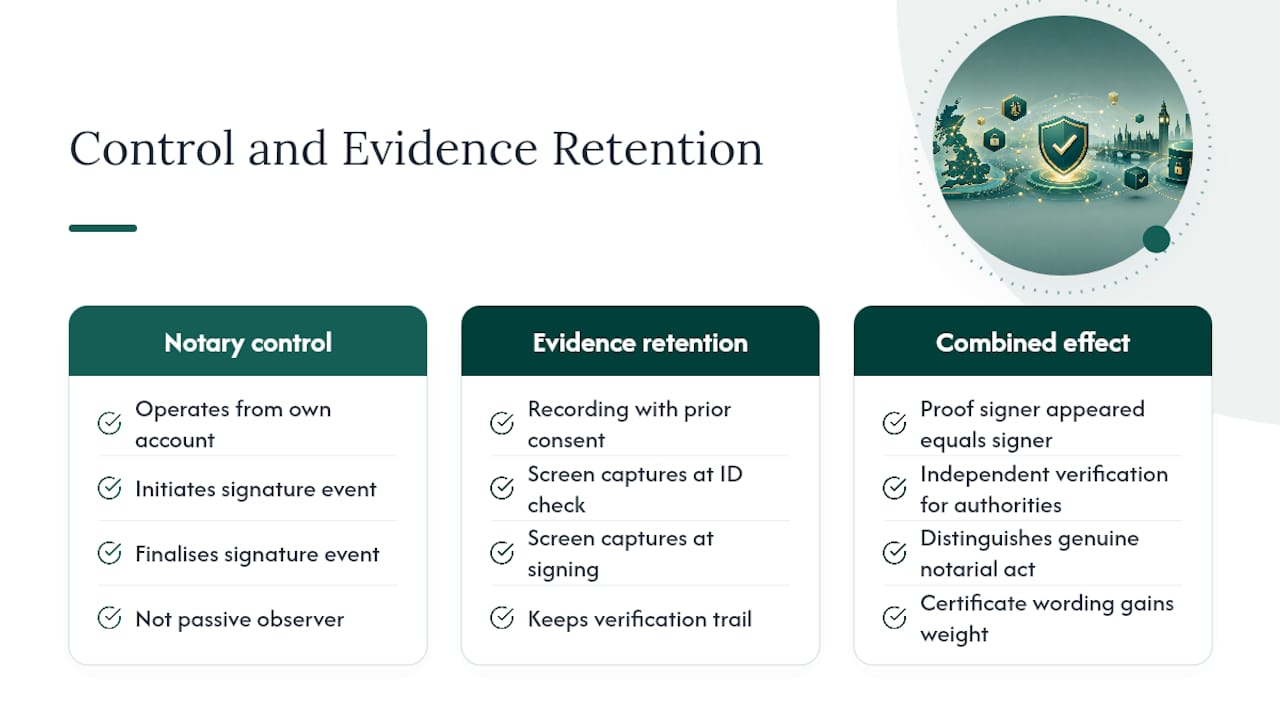
Control is the concept that separates a properly conducted video notarisation from a video call that merely looks like one. When an electronic signature platform is involved, the notary is expected to operate the signing process from their own account rather than watch a signatory click "sign" on a shared screen. This keeps the notary as the party who initiates and finalises the signature event, rather than a passive observer to something the signatory controls entirely.
Evidence retention works alongside this. With prior consent, the notary keeps a recording of the call or takes screen captures at key moments, typically the ID check and the signing itself. This isn't a formality. It's the record a notary can point to later if a receiving authority queries how the appearance was verified, or if the document's validity is ever challenged.
The two together, notary-controlled signing and retained evidence, form the practical backbone of why remote notarisation can stand up to scrutiny in the first place. A screen-share signing with no recorded verification trail gives a receiving authority nothing to check against. A controlled signing with retained evidence gives them exactly what they need: proof the person who appeared is the person who signed, verified by someone independent of the transaction. That difference is precisely what separates informal video witnessing from a genuine notarial act, and it's why the wording on your certificate and the retention of supporting evidence both matter as much as the identity check itself.
Will the receiving authority actually accept it?
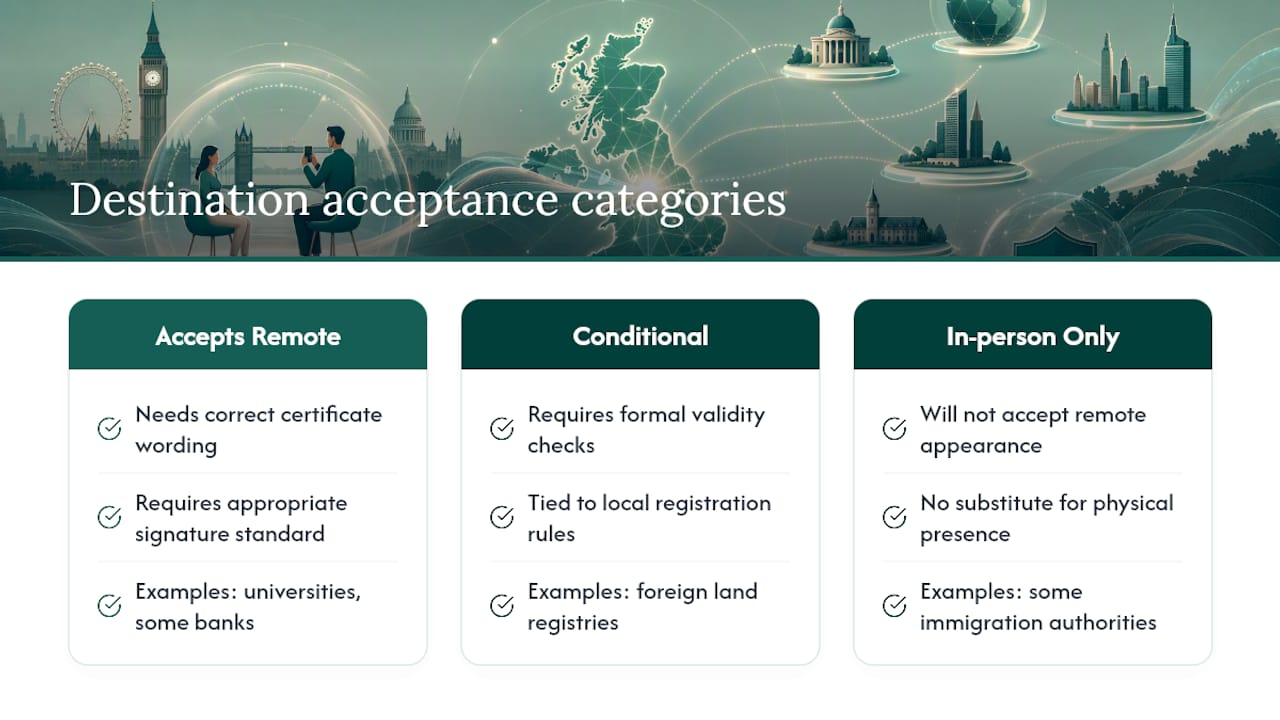
This is the question that should shape your entire booking decision, because acceptance isn't universal. A foreign land registry, a UK bank, an overseas university, and an immigration authority can all take different positions on remote notarial acts, sometimes for reasons that have nothing to do with the notarisation's quality.
Some destinations accept remote appearance without hesitation, provided the certificate is worded correctly and the signature meets an appropriate standard. Others require formal validity checks tied to their own local registration rules, and a small number will only accept an in-person appearance regardless of how the video call was conducted. Faculty Office guidance is explicit that notaries should check these destination requirements and tell you plainly when acceptance can't be confirmed, rather than proceeding on an assumption.
The practical fix is simple but frequently skipped: contact the receiving organisation before you book, not after. Ask specifically whether they accept a notarial act completed via remote appearance, and whether they need an apostille, a physical original, or a specific signature standard alongside it. If a bank or land registry official can't answer clearly, ask them to check internally rather than guessing on your behalf. For property transactions abroad in particular, local notarial procedure can differ substantially from the process a video appointment follows, which is worth understanding before you assume a remote certificate will transfer cleanly into a foreign registration system. Our remote online notarisation requirements guide breaks down destination checks by document type in more detail.
The regulatory landscape behind remote notarisation
Video notarisation isn't a workaround invented by technology platforms. It operates within a recognised framework of professional guidance that governs how a commissioned notary can perform remote appearances and produce valid notarial acts. That guidance defines what counts as an acceptable remote technology, sets expectations for identity verification, and specifies how electronic notarial acts should be secured to match the reliability of a paper equivalent.
Different jurisdictions take different approaches to the same underlying question: can a person legally "appear" before a notary without being in the same room? Some frameworks are permissive and treat video conferencing as functionally equivalent to physical presence, provided identity and capacity checks are rigorous. Others remain cautious, particularly for documents tied to land, probate, or company registration, where formal validity in the destination jurisdiction carries more weight than convenience.
For anyone using video notarisation across borders, the practical implication is that the notary's home jurisdiction sets the rules for how the appearance is conducted, but the destination jurisdiction sets the rules for whether the resulting document will actually be accepted. Both frameworks matter, and neither can be assumed from the other. This is precisely why a competent notary asks about the destination before agreeing to proceed, and why a client who skips that question is the one most likely to be disappointed later.
Technical requirements and security measures for video platforms
A video notarisation platform needs more than a video call function to do this job properly. The baseline, according to consumer-facing guidance on online notarisation, is a stable internet connection, a working webcam, and secure document handling from upload to delivery. Beyond that baseline, several features separate a platform built for notarial work from a generic video-calling tool.
Encrypted document transmission matters because identity documents and sensitive contracts are moving between you, the notary, and sometimes a receiving authority. Biometric verification tools, where a platform cross-checks a live facial scan against the submitted ID photo, add a layer of fraud resistance that manual visual comparison alone doesn't offer. Session recording with consent-based retention, kept for a defined period rather than indefinitely, provides the evidential backbone discussed earlier without turning into an unmanaged data store.
Signature infrastructure is the other technical pillar. A platform supporting a Qualified Electronic Signature, alongside a digital facsimile of the notary's seal, gives the resulting document a security standard comparable to a paper notarial act. Platforms that skip this and rely on a basic electronic signature may produce a document that looks finished but won't satisfy a recipient who expects that higher standard. Checking a platform's ID verification workflow against practical procedures, such as those described in guidance on document checks during video notarisation, is a reasonable step before trusting a document to it.
Privacy and data protection during video notarisation
Video notarisation involves handing over some of the most sensitive information you hold: passport scans, signatures, and a recorded video of your face confirming your identity. How that data is stored and for how long deserves the same scrutiny you'd give a bank before sharing financial details.
Reputable platforms should be explicit about retention periods for recordings and screen captures, and should only retain that evidence with your prior consent, in line with the approach set out in Scottish notarial guidance. Ask before your appointment how long your ID scans and call recording will be kept, and whether that data is stored encrypted and separately from general business records.
Document upload channels should be secure by default, not an email attachment sent to a personal inbox. If a platform asks you to send a passport scan by regular email, treat that as a signal to look elsewhere. The same applies to how identity verification results are shared with third parties: a receiving authority may need confirmation that verification took place, but it rarely needs your raw biometric data. Good practice keeps that distinction clear, sharing only the notarial certificate and evidence of the process, not the underlying personal data itself.
When an online notary is the better choice
Remote notarisation earns its place when speed and location genuinely matter more than tradition. Visa applicants racing a deadline, graduates needing a degree certificate certified for an overseas employer, and company directors who need a resolution signed while travelling all face the same problem: an in-person appointment adds days they don't have.
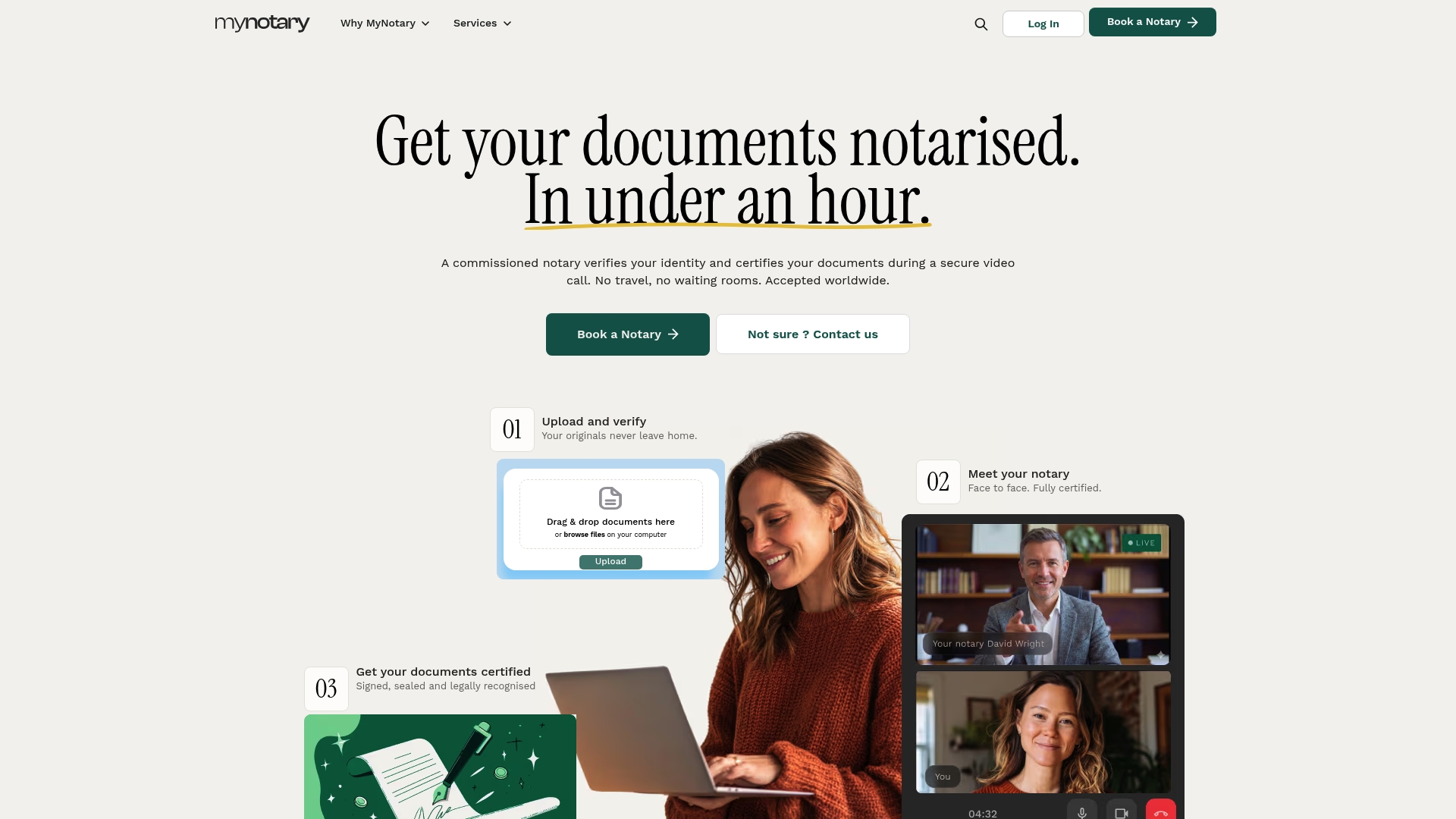
There are online platforms that let you upload documents, verify your identity, and connect with a commissioned notary by video call from home, without booking a physical appointment or losing a day to travel. For a marital status affidavit needed before a visa deadline, or a corporate document that needs signing across three time zones, that turnaround difference is often the entire reason remote notarisation gets chosen over the traditional route. It won't replace in-person notarisation for every document type, particularly where a destination insists on it, but for the routine certifications most people and businesses actually need, it removes friction the old process never had to justify.
— Jérémy
Get your document notarised by video with My Notary
Certain services handle the process described in this article: upload your document, verify your identity on a secure video call with a commissioned notary, and receive your certified document without leaving home. Identity checks may run on biometric verification, and signatures are produced to a standard recognised in many countries, helping ensure the result will hold up where it needs to.
If you need a signature certified for a contract or personal document, the online signature certification service is built exactly for that. Handling a power of attorney, a marital status affidavit for a visa, or a degree certificate for overseas study? There are dedicated booking pages for each, so you're matched with the right process from the start rather than a generic form. Upload your document today and get a same-day appointment with a commissioned notary.
Sources
- Remote appearance — The Faculty Office
- Guidance re Non face-to-face Notarisation — Law Society of Scotland
- Guide to online notarisation in the UK — Oneflow
FAQ
Is video notarization legally valid?
Video notarisation can produce a legally valid notarial act, but validity for your specific purpose depends on whether the receiving authority accepts remote appearance and the signature standard used. Always confirm acceptance with the recipient before booking.
What's the difference between remote appearance and an electronic notarial act?
Remote appearance describes how you show up to the notary, by video rather than in person. An electronic notarial act describes the format of the resulting document, which can be fully digital or a printed, stamped copy.
What ID do I need for a video notarisation call?
A valid passport or driving licence is typically required, held up to the camera for comparison against a digital copy submitted beforehand. Some platforms, including My Notary, add biometric verification for an extra layer of identity confirmation.
Can a notary refuse to notarise a document by video?
Yes. A notary can decline a remote appointment if they can't confirm the destination will accept it, if registration requirements at the destination conflict with remote appearance, or if anti-money-laundering concerns arise during the identity check.
Does the video call get recorded?
Only with your prior consent. Reputable notaries retain a recording or screen captures as evidence of the appearance and identity check, kept for a defined retention period rather than indefinitely.
How fast can I get a document notarised by video with My Notary?
Some platforms offer a process designed for same-day turnaround from upload to a certified document, connecting you with a commissioned notary by video call without the wait times of traditional in-person booking.
Recommended
Got questions? We’re on it.
Most questions are answered here, drawn from what people actually ask before booking. If yours isn’t, our team is in chat.
Video notarisation can produce a legally valid notarial act, but validity for your specific purpose depends on whether the receiving authority accepts remote appearance and the signature standard used. Always confirm acceptance with the recipient before booking.
Last updated: